Partners wanted: usrinfo.tech/partners
USR Apps
USR INFOTECHUSR Apps
Coming soonPreviewFor small and mid-size businesses

Ask Claude, ChatGPT or Microsoft Copilot about your USR data

One USR connector. One USR sign-in. Your own AI account. Preview starts Dec 2026.

Powered by USR Apps
Business team, India
India
Business team, Middle East
Middle East
Business team, East Asia
East Asia
Business team, Africa
Africa
4AI tools plannedClaude, ChatGPT, Microsoft Copilot and Gemini
10tools at preview100+ planned as more USR apps join
1sign-in for all appsYour USR sign-in, your own AI account
Offby defaultYour company admin switches it on

How it works

Your AI tool talks to one USR connector. The connector reads your USR apps with your USR sign-in and your USR role.

See it in action

A sample conversation, played on a loop. Watch the concept video below.

Your AI toolUSR connector · signed in

Sample answers with made-up data.

English
हिन्दी

Ask the way you talk

Type a question in the AI tool your company already uses. The USR connector reads only what your USR role allows, and answers from your own USR data.

USR PMS
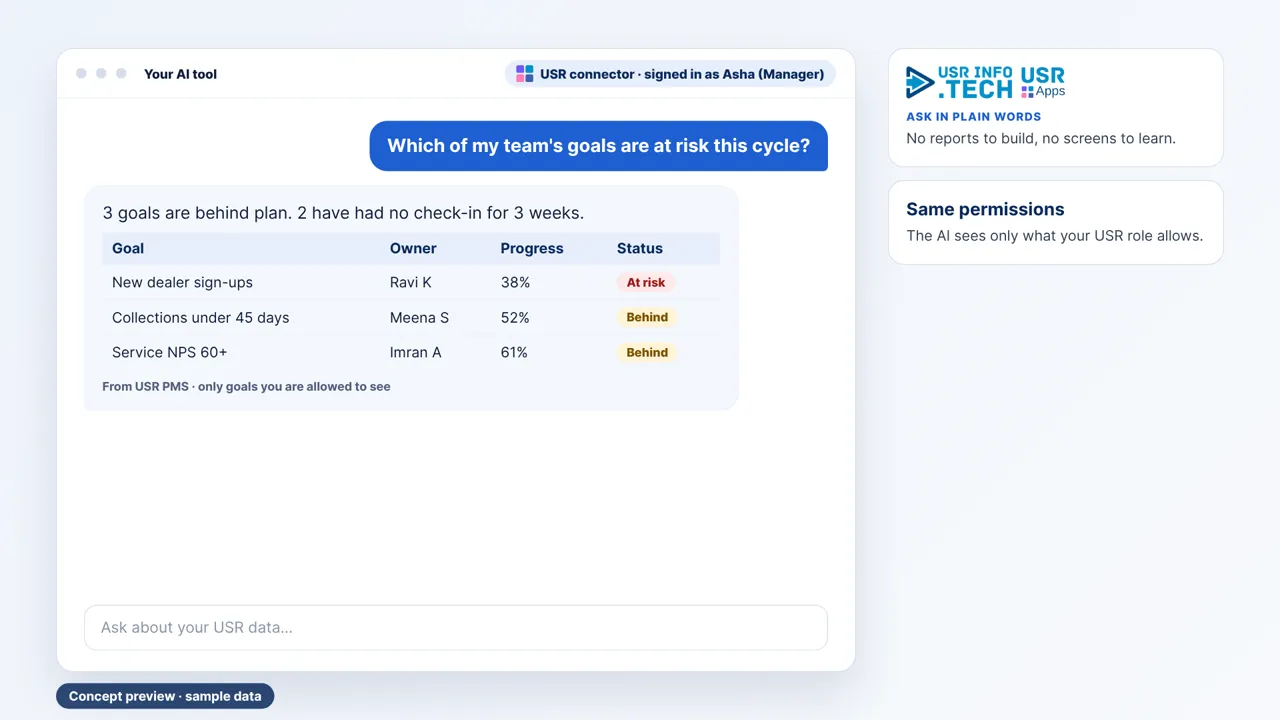
"Which of my team's goals are at risk this cycle?"
3 goals are behind plan. 2 have no check-in for 3 weeks. Shall I list them with owners?
USR HRIS + USR PMS
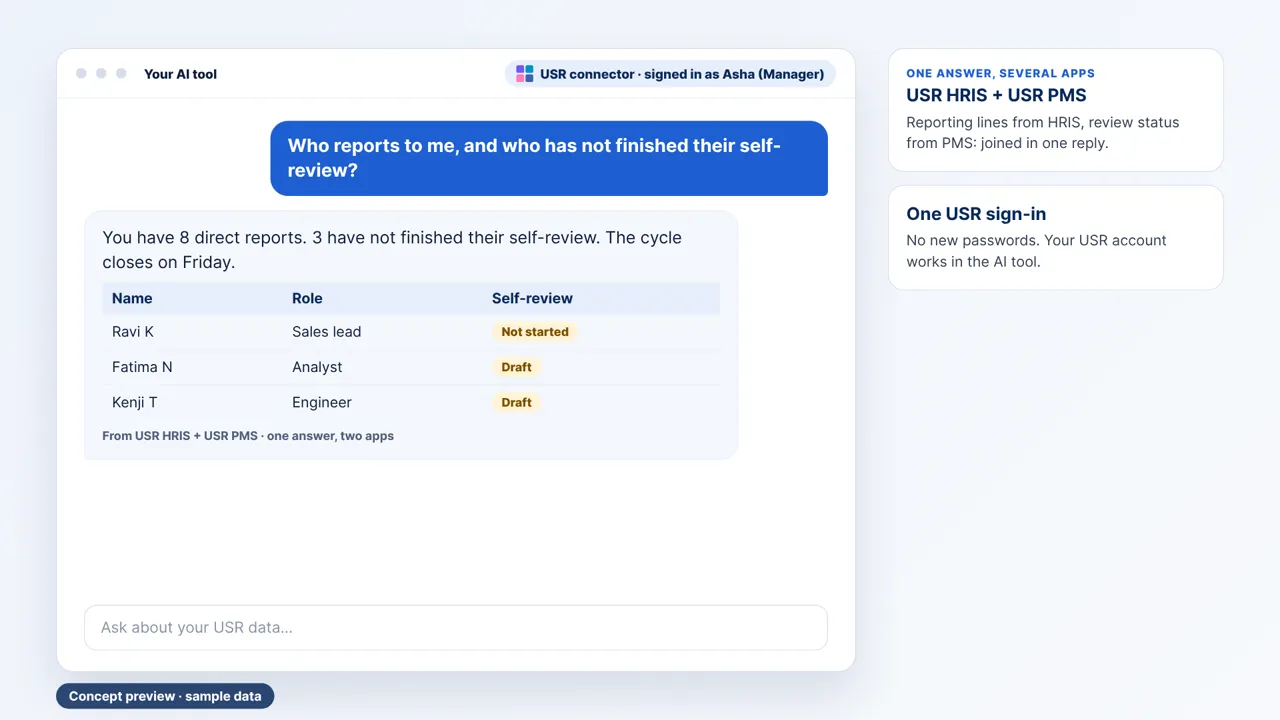
"Who reports to me, and who has not finished their self-review?"
You have 8 direct reports. 3 have not finished their self-review; the cycle closes on Friday.
USR Desk · next
"Show open tickets older than 3 days."
5 open tickets are older than 3 days. The oldest is 6 days, waiting on IT.

Sample answers with made-up data, to show the idea.

Why it helps

Less clicking, faster answers, and the same controls you already trust in USR.

Ask in plain words, no extra screens to learn
One answer can join several USR apps
Same roles and permissions as in USR
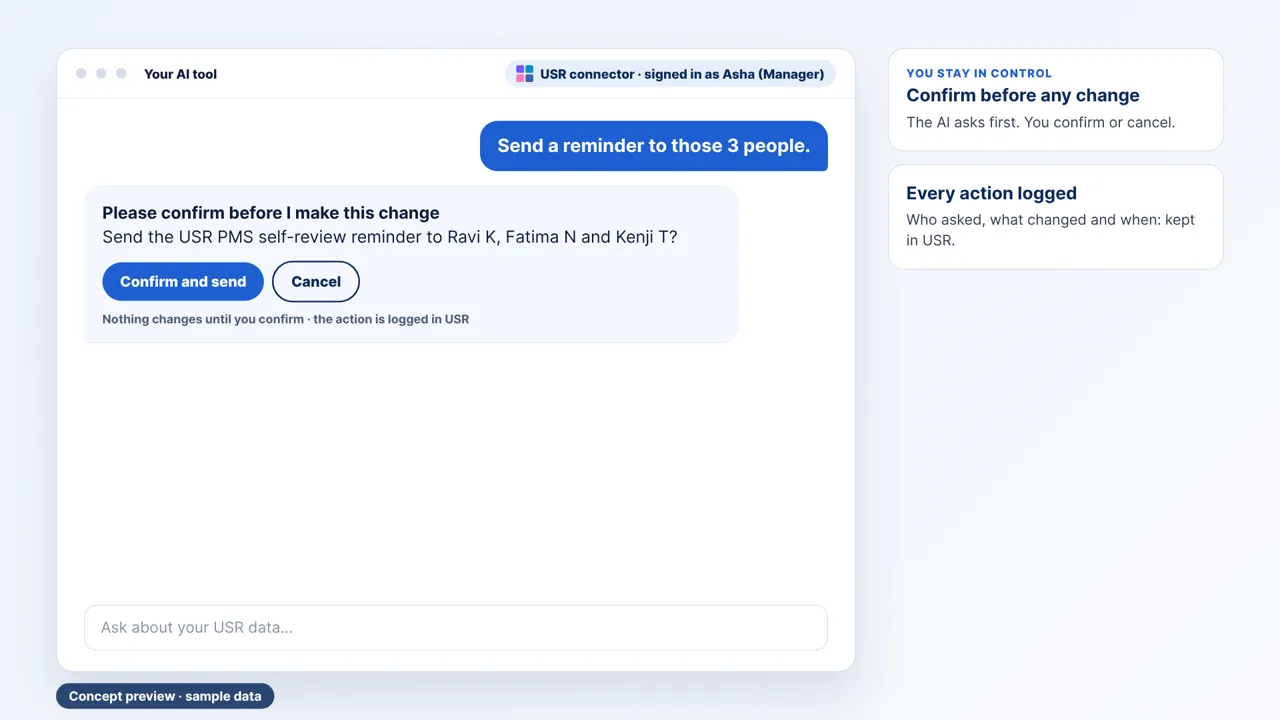
You confirm before any change is made
Choose the AI tool your company already uses

Use cases by role

Everyone asks about their own work, within their USR role.

CEO

Founder or CEO

  • "Which teams are behind on this quarter's goals?"
  • "How many people joined and left this month?"
USR PMS · USR HRIS
HR

HR head

  • "Who has not finished their self-review?"
  • "List people whose probation ends this month."
USR HRIS · USR PMS
MG

Line manager

  • "Which of my team's goals are at risk?"
  • "Remind my team to update check-ins. (you confirm)"
USR PMS
EM

Employee

  • "What are my goals this cycle?"
  • "How many leave days do I have left?"
USR PMS · USR HRIS
SV

Service lead

  • "Show open tickets older than 3 days."
  • "Which customer raised the most tickets this week?"
USR Desk (next)
SL

Sales lead

  • "Which deals are stuck for 2 weeks?"
  • "Summarise last week's pipeline changes."
USR CRM Lite (next)

How it helps your business

Built for small and mid-size businesses that want AI benefits without a big AI project.

Answers in secondsNo report building, no exports to Excel just to answer one question.
Less trainingPeople ask in plain words in a tool they already use every day.
Joined-up viewOne question can pull from several USR apps, because they share one record.
Better follow-throughReminders and updates happen right after the question, with your confirmation.
Use the AI you already pay forBring the AI account your company already has; USR adds the connector.
Control stays with youOff by default, same USR roles, every action logged.

Concept screens

Concept screen: Ask in plain words (USR PMS)
1. Ask in plain words (USR PMS)
Concept screen: One answer, two apps (HRIS + PMS)
2. One answer, two apps (HRIS + PMS)
Concept screen: You confirm before any change
3. You confirm before any change
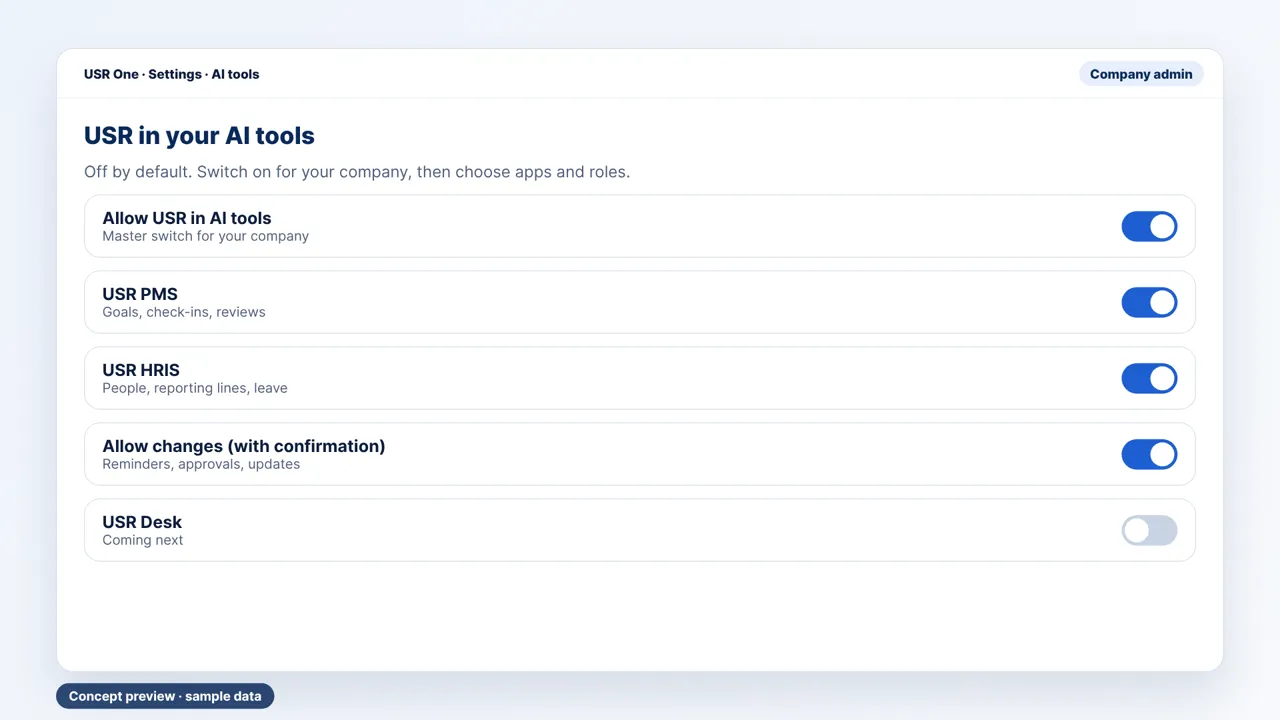
Concept screen: Admin switch: off by default
4. Admin switch: off by default
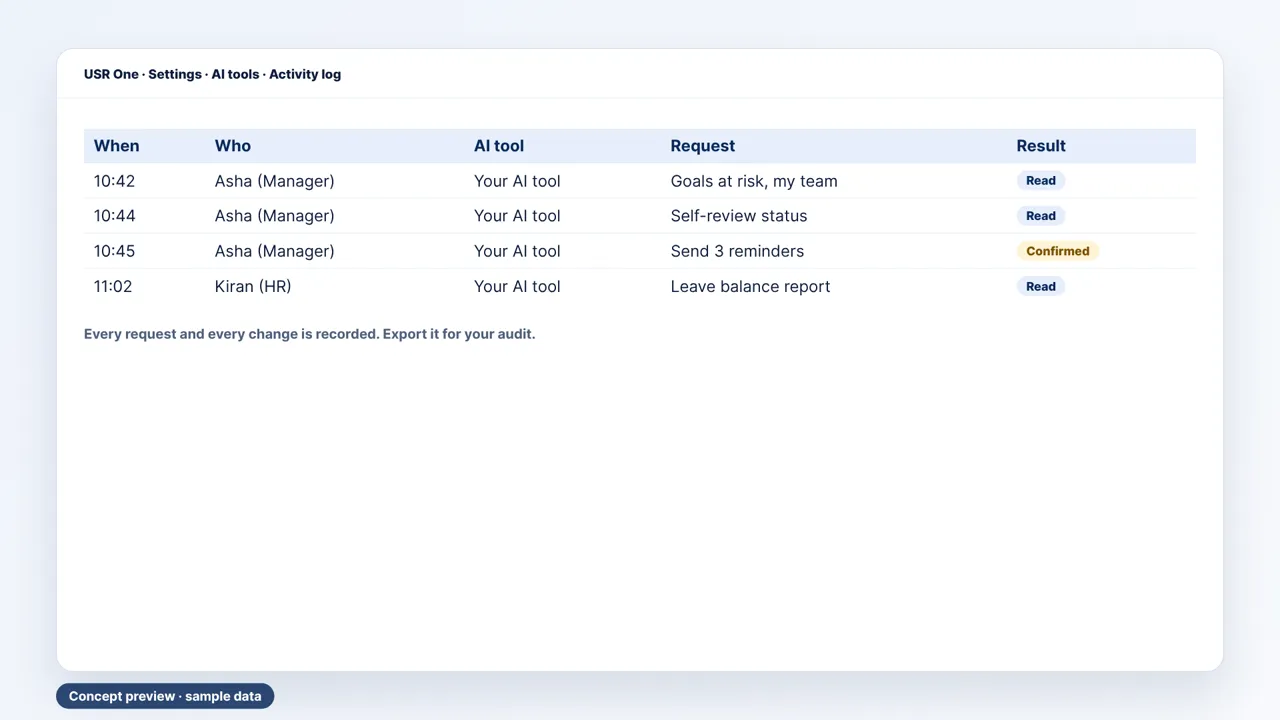
Concept screen: Every action logged
5. Every action logged
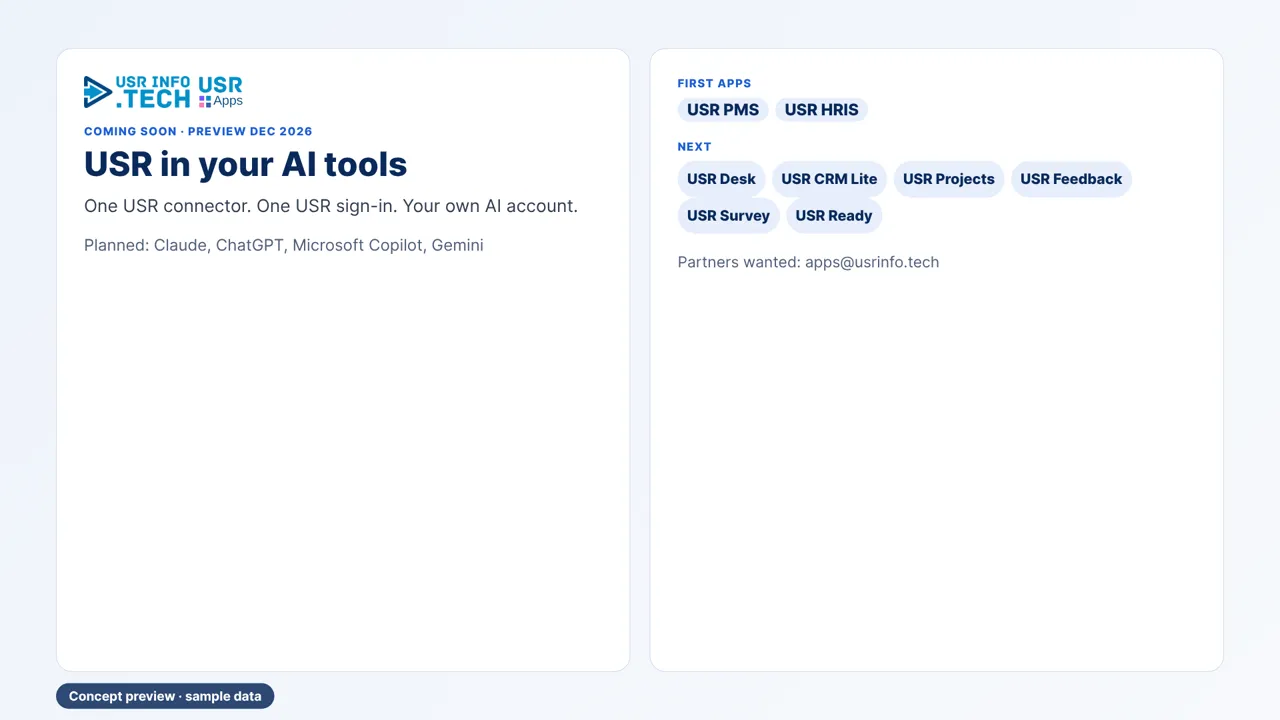
Concept screen: First apps and what comes next
6. First apps and what comes next

Concept preview · sample data. Tap a screen to see it full size.

Safe by design

Nothing changes until your company decides.

Off until your company admin switches it onEvery action loggedHosted on AWSISO 27001ISO 42001DPDP ReadyGDPR ReadySOC 2 Ready

Your data, your rules

Built for the questions IT and security teams ask first.

Your own USR sign-inThe admin adds the connector once for the company. Each employee signs in with their own USR login: no shared key, own permissions, own log.
Allowed AI tools onlyThe admin picks which AI tools and accounts may connect, for example the company's business plan. Personal AI accounts can be blocked.
Sensitive fields blockedSalary, bank details, ID numbers and personal contact data can be blocked, so they are never sent to any AI tool.
Attachments off by defaultFiles and documents do not go through the connector unless the admin allows it.
Use-case packsAllow only the tasks you want, such as goal suggestions or development plan drafts. Everything else stays off.
Every request loggedWho asked, from which AI tool, what was read or changed, and when. Export it for your audit.
Same roles as in USRA manager sees their own team, HR sees what HR may see, an employee sees their own data.
USR Assist stays insideIf your company keeps the connector off, the AI helper inside every USR app is still there.
About drag and drop: if someone drags a file into an AI tool themselves, that happens inside the AI tool, so your company's AI plan and IT policy apply. We recommend a business AI plan that does not train on your data, together with your own data-leak controls. What goes through the USR connector stays under the controls above.

Use-case packs: allow only what you want

Start with safe tasks where confidential data is not needed. Add more when you are ready.

PMS starter pack

Switched on by the admin. Safe tasks where confidential data is not needed.

Suggest goals for a roleUses role and team goals; no personal data
Draft an individual development planA draft for the manager to check
Summarise appraisal commentsManager's own team only; a draft to check
Send check-in remindersAsks you to confirm first

Stays off until you decide

Sensitive areas need an explicit admin choice.

Salary and pay dataOff until the admin allows
Ratings across the whole companyOff until the admin allows
Personal and ID detailsOff; can be blocked for good
File attachmentsOff by default

More packs are planned with each wave, for example HRIS, Desk and CRM Lite. Pack names and tasks may change.

Voice or text in, Excel or text out

Ask the way you like and get the answer in the format you need.

Ask by voice or by typing

If your AI tool supports voice, just speak. The USR connector works the same way for spoken and typed questions.

"Give me my team's goal status as an Excel sheet."
"How do I set up a review cycle in USR PMS?"

Get the answer in the format you need

The connector sends only the data you are allowed to see. Your AI tool turns it into the format you ask for.

Excel sheetCSV fileTablePlain text

The same role limits and field blocks apply to every export, and every export is logged.

How-to help, always safe"How do I add a new employee?" Answers come from USR manuals and the Knowledge Base, not from your company data.
Set-up questions answeredAdmins can ask how to configure cycles, approvals or roles, step by step.
Templates on requestAsk for an Excel template to fill in and import into USR.

Who gains what

Value for every level, from the CXO to the employee, and for our partners.

CXOs and founders
  • Company-wide answers in plain words, within their role
  • Faster reviews of goals, hiring and service
  • AI adoption without a big project
Admins and IT security
  • Off by default; one switch for the company
  • Allow-list of AI tools; personal accounts blockable
  • Field blocks, attachment control, full activity log
HR heads
  • Review-cycle status and reminders in seconds
  • How-to help for every USR set-up
  • Excel exports for audits and meetings
Managers
  • Goal suggestions and development plan drafts
  • Team appraisal summary drafts to check
  • Nudges sent only after confirming
Employees
  • Own goals, leave and tasks by asking
  • Help on how to use USR, any time
  • Same privacy as inside USR
Partners
  • Offer AI-ready USR apps to clients
  • Set up packs and controls for each client
  • New service and upsell opportunities

Roadmap

Every step below is coming soon. Dates can move with each AI provider's plans and reviews.

  1. Preview in ClaudeDec 2026Coming soon
  2. Claude directory listingAfter reviewComing soon
  3. ChatGPT and Microsoft CopilotQ1 2027Coming soon
  4. More USR appsIn wavesComing soon
  5. GeminiTo be reviewedComing soon

Which USR apps

First apps

USR PMSUSR HRIS

Next

USR DeskUSR CRM LiteUSR ProjectsUSR FeedbackUSR SurveyUSR Ready

Join the preview with our usual form: your request is marked "USR in your AI tools". No extra form, no obligation.

Steps to connect (planned)

Five simple steps. Exact steps will be published at preview.

Admin switches it onIn USR One, go to Settings, then AI tools. Switch on USR in your AI tools and choose the apps.
Choose what is allowedKeep it read-only, or allow changes with confirmation. USR roles and permissions apply as usual.
Add the USR connectorIn your AI tool, add the USR connector from its connectors or apps section (we will share the exact steps at preview).
Sign in with USRUse your normal USR sign-in. The AI tool then sees only what your USR role allows.
Ask your first questionTry: "Which of my team's goals are at risk this cycle?"

How to navigate

In USR (company admin)

Activity log: Settings › AI tools › Activity log.

In your AI tool (each user)

The menu name differs by AI tool. We will publish a short guide for each tool at preview.

Why USR is different

Compared with how most business software adds AI today.

What mattersTypical business software todayUSR in your AI tools (planned)
How many places to askSeparate AI chat inside each app, if anyOne connector across your USR apps
Which AI you useUsually the vendor's own built-in AIYour choice: the AI tool your company already uses
Questions across appsData spread across many vendors and loginsOne record and one sign-in across USR apps
Changes to dataConfirmation steps vary by productYou confirm before any change
Control and auditSettings and logs vary by productOff by default; every action logged in USR
AI accountOften a separate AI add-on to buy per appUse the AI account your company already has; USR pricing shared before the preview

General market patterns, not a claim about any named product. USR features shown are planned and may change.

Your AI transformation, one step at a time

Start with questions. Add actions when you are ready. Automate later.

1AskRead-only answers from your USR data in plain words. The safest way to start using AI at work.Preview Dec 2026
2Act, with confirmationReminders, approvals and updates from the chat. You confirm every change; it is logged.Coming soon
3Automate the routineWeekly summaries and follow-ups across apps, set up by your admin.Planned
No big AI projectStart with one switch and one question, not a new platform.
Your data stays in USRHosted on AWS, ISO 27001, ISO 42001, DPDP, GDPR and SOC 2 Ready.
Everyone can take partManagers and employees use AI on their own work data, within their roles.

Questions we hear

When can we use it?

The preview is planned to start in December 2026 in Claude, with USR PMS and USR HRIS. Join the preview on this page.

Do we need a new AI account?

No. You use the AI account your company already has. USR adds the connector and your USR sign-in.

Can the AI see everyone's data?

No. It sees only what your USR role allows, the same as when you use USR directly.

Can the AI change our data?

Only if your admin allows changes, and only after you confirm each change. Every action is logged in USR.

Is it on for everyone straight away?

No. It is off by default. Your company admin decides when to switch it on and for which apps.

What does it cost?

Pricing will be shared before the preview. AI tool subscriptions are with each AI provider.

Which AI tools are planned?

Claude first, then ChatGPT and Microsoft Copilot (planned for Q1 2027). Gemini is to be reviewed. Availability depends on each provider's plans and reviews.

Can partners offer this to clients?

Yes. Domestic, regional and global partners can offer AI-ready USR apps. Write to apps@usrinfo.tech.

Will our whole USR database be connected to the AI tool?

No. Nothing is shared until your admin switches it on. For each question, the connector fetches only the records that person's role allows, for that one request. Your data stays stored in USR on AWS.

Our IT does not allow personal AI accounts. Can we still use it?

Yes. The admin can allow only the company's approved AI accounts and block personal ones. Or keep the connector off and use USR Assist inside USR.

Is it one shared key for the whole company?

No. The admin sets it up once, but each employee signs in with their own USR login, so permissions and logs are per person.

We use more than one AI tool. Is that a problem?

No. One USR connector works with each allowed AI tool, with the same USR login and permissions. The log shows which tool made each request.

Can salary or bank details reach the AI tool?

Not if you block them. Admins can exclude sensitive fields such as salary, bank details and ID numbers so they are never sent.

Can we allow only a few tasks?

Yes. Use-case packs let the admin switch on only chosen tasks, for example goal suggestions and development plan drafts in USR PMS.

Can I get data as an Excel sheet?

Yes. Ask for Excel, CSV, a table or text. The connector sends only permitted data and the AI tool formats it. Every export is logged.

Can I ask by voice?

Yes, if your AI tool supports voice. The connector treats spoken and typed questions the same way.

Domestic, regional and global partners wanted

Offer your clients AI-ready USR apps.

apps@usrinfo.tech

Share the news

Ready text for LinkedIn. Copy it, then share.

USR in your AI tools, coming soon
Ask your AI tool about your USR data, safely. 🤖🔒

Coming soon: USR in your AI tools. Preview starts Dec 2026.

💬 "Suggest goals for my sales team."
💬 "Draft a development plan for Priya."
💬 "Give me my team's goal status as an Excel sheet."
💬 "How do I set up a review cycle in USR PMS?"

How it stays safe:
✅ Off until your company admin switches it on
✅ Each employee signs in with their own USR login
✅ Admin chooses which AI tools are allowed, personal accounts can be blocked
✅ Salary, bank and ID fields can be blocked completely
✅ Ready use-case packs: allow only the tasks you want
✅ You confirm before any change; every action logged

Set up in 4 steps:
1️⃣ Admin switches it on in USR settings
2️⃣ Choose AI tools and a use-case pack
3️⃣ Add the USR connector in your AI tool
4️⃣ Sign in with USR and ask

For CXOs, HR heads, managers and employees in small and mid-size businesses.

Join the preview 👉 https://usrinfo.tech/ai-connect/
Follow linkedin.com/company/usrinfotech and linkedin.com/company/usrapps
Domestic, regional and global partners wanted: apps@usrinfo.tech

#USRApps #AI #SaaS #SME #HRTech #MadeInIndia
Share the link

Follow USR INFOTECH and USR Apps on LinkedIn for updates.

Availability depends on each AI provider's plans and reviews. AI tool names are shown only to say they are compatible and belong to their owners.

One sign-in One record PeopleSalesServiceFinanceOperations

USR One: one record, one sign-in, every department

Enter a person, customer or vendor once and every USR app uses it. Your team signs in once for all five suites: People, Sales & Marketing, Service, Finance and Operations. Start with one suite and add the next with nothing to re-key.

  • Free for up to 10 people
  • One sign-in for every app
  • One bill
  • AI in every app
  • ISO 27001 · ISO 42001 · DPDP Ready · GDPR Ready · SOC 2 Ready

Free to use: USR Assist USR Ready POSH essentials USR WorkforceNew USR BGVPreview Salary breakup Payslip maker GST calculator Compliance calendar PF and ESI

Found this useful? Share it

Why companies choose USR One

Connected apps, not scattered dataEvery app shares one record for people, customers and finance. Enter data once and it flows everywhere.
One USR sign-in across your companyEvery person, every app, one login: USR login, Microsoft, Google or company SSO.
50+ apps for every departmentHR, sales, finance, support and operations. Start with one and add more as you grow.

See all 50+ apps →

USR INFOTECHUSR Apps

Trusted by 1,000+ customers since 2013

Business apps for fast-growing small and mid-size businesses and GCCs

ISO 27001ISO 42001DPDP ReadyGDPR ReadySOC 2 ReadyHosted on AWS
50+ connected apps25+ countries19 languages✨ AI-native apps
Built for every industry
Some of our customers
  • Kintetsu World Express (India) logo
  • Simpson & Co. logo
  • iValue Group logo
  • ZeOmega logo
  • Birla Elevators logo
  • Linux Laboratories logo
  • Royal Orchid Hotels logo
  • Emmvee logo
  • Jet2 Travel Technologies logo
  • GMM Pfaudler logo
  • Knight FinTech logo
  • Khoj Information Technology logo
  • CSSI (Computer Software & Solutions International) logo
  • Chirok Health logo
  • DIC India logo
  • DoveRunner logo
  • STP Investment Services logo
  • Boston Technology Corporation logo
  • Tescra logo
  • Quikjet Airlines logo
  • 86400 (Mobileware Technologies) logo
  • REConnect Energy logo
  • Relativity logo
  • Youth For Seva logo
  • BiofuelCircle logo
  • Dataction logo
  • Dextrus logo
  • KUN Capital logo
  • STIC Soft logo
  • AppXcelerate Solutions logo
  • Miota Research logo
  • Kott Software logo
  • Wondersoft logo
  • Responsive Media Tech Services logo
  • SabPaisa (SRS Live Technologies) logo
  • Emertxe Information Technologies logo
See our customers →Partners wanted · apps@usrinfo.tech
Thank you, in every Indian language ❤
  • धन्यवाद Hindi
  • ಧನ್ಯವಾದಗಳು Kannada
  • நன்றி Tamil
  • ధన్యవాదాలు Telugu
  • നന്ദി Malayalam
  • ধন্যবাদ Bengali
  • आभारी आहे Marathi
  • આભાર Gujarati
  • ਧੰਨਵਾਦ Punjabi
  • ଧନ୍ୟବାଦ Odia
  • ধন্যবাদ Assamese
  • شکریہ Urdu
  • धन्यवादः Sanskrit
  • देव बरें करूं Konkani
  • धन्यवाद Nepali
  • धन्यवाद Maithili
  • شُکریہ Kashmiri
  • ꯊꯥꯒꯠꯆꯔꯤ Manipuri
  • Thank you English
Thank you, in languages of the world 🌍
  • Thank you English
  • شكرًا Arabic
  • Merci French
  • Gracias Spanish
  • Obrigado Portuguese
  • Danke German
  • Terima kasih Malay
  • Terima kasih Indonesian
  • Salamat Filipino
  • ขอบคุณ Thai
  • Cảm ơn Vietnamese
  • ස්තුතියි Sinhala
  • Asante Swahili
  • ありがとう Japanese
  • 谢谢 Chinese
Start free